
Aztec Network
Feb 7th, 2019
## min read

From zero to nowhere: smart contract programming in Huff (1/4)

In this series, learn smart contract programming in Huff directly from Zac.

Share
Written by
Zac Williamson
Edited by

Hello there!

I want to write about a piece of runoff that has oozed out of the primordial slop on the AZTEC factory floor: …Huff.

Huff is an Ethereum smart contract programming ‘language’ that was developed while writing weierstrudel, an elliptic curve arithmetic library for validating zero-knowledge proofs.

Elliptic curve arithmetic is computationally expensive, so developing an efficient implementation was paramount, and not something that could be done in native Solidity.

It wasn’t even something that could be done in Solidity inline assembly, so we made Huff.

To call Huff a language is being generous — it’s about as close as one can get to EVM assembly code, with a few bits of syntactic sugar bolted on.

Huff programs are composed of macros, where each macro in turn is composed of a combination of more macros and EVM assembly opcodes. When a macro is invoked, template parameters can be supplied to the macro, which themselves are macros.

Unlike a LISP-like language or something with sensible semantics, Huff doesn’t really have expressions either. That would require things like knowing how many variables a Huff macro adds to the stack at compile time, or expecting a Huff macro to not occasionally jump into the middle of another macro. Or assuming a Huff macro won’t completely mangle the program counter by mapping variables to jump destinations in a lookup table. You know, completely unreasonable expectations.Huff doesn’t have functions. Huff doesn’t even have variables, only macros.

Huff is good for one thing, though, which is writing extremely gas-optimised code.The kind of code where the overhead of the jump instruction in a function call is too expensive.

The kind of code where an extra swap instruction for a variable assignment is an outrageous luxury.At the very least, it does this quite well. The weierstrudel library performs elliptic curve multiple-scalar multiplication for less gas than the Ethereum’s “precompile” smart contract. An analogous Solidity smart contract is ~30–100 times more expensive.

It also enables complicated algorithms to be broken down into constituent macros that can be rigorously tested, which is useful.

Huff is also a game, played on a chess-board. One player has chess pieces, the other draughts pieces. The rules don’t make any sense, the game is deliberately confusing and it is an almost mathematical certainty that the draughts player will lose. You won’t find references to this game online because it was “invented” in a pub by some colleagues of mine in a past career and promptly forgotten about for being a terrible game.

I found that writing Huff macros invoked similar emotions to playing Huff, hence the name.

{{blog_divider}}

Programming in Huff

Given the absence of any documentation, I figured it might be illuminating to write a short series in how to write a smart contract in Huff. You know, if you’re looking for time to kill and you’ve run out of more interesting things to do like watch paint dry or rub salt in your eyes.

If you want to investigate further, you’ll find Huff on GitHub. For some demonstration Huff code, the weierstrudel smart contract is written entirely in Huff.

{{blog_divider}}

“Hello World” — an ERC20 implementation in Huff

Picture the scene — the year is 2020 and the world is reeling from a new global financial crisis. With the collapse of the monetary base, capital flees to the only store of stable value that can be found — first-generation Crypto-Kitties. Amidst this global carnage, Ethereum has failed to achieve its scaling milestones and soaring gas fees cripple the network.It is a world on the brink, where one single edict is etched into the minds citizens from San Francisco to Shanghai — The tokens must flow…or else.

This is truly the darkest timeline, and in the darkest timeline, we code in Huff.

{{blog_divider}}

Finding our feet

We’re going to write an ERC20 token contract. But not just any ERC20 contract— we’re going to write an ERC20 contract where every opcode must justify its place, or be scourged from existence…

Let’s start by looking at the Solidity interface for a ‘mintable’ token — there’s not much point in an ERC20 contract if it doesn’t have any tokens, after all.

function totalSupply() public view returns (uint);

function balanceOf(address tokenOwner) public view returns (uint);

function allowance(address tokenOwner, address spender) public view returns (uint);

function transfer(address to, uint tokens) public returns (bool);

function approve(address spender, uint tokens) public returns (bool);

function transferFrom(address from, address to, uint tokens) public returns (bool);

function mint(address to, uint tokens) public returns (bool);

event Transfer(address indexed from, address indexed to, uint tokens);

event Approval(address indexed tokenOwner, address indexed spender, uint tokens);

That doesn’t look so bad, how hard can this be?

{{blog_divider}}

Bootstrapping

Before we start writing the main subroutines, remember that Huff doesn’t do variables. But there’s a macro for that! Specifically, we need to be able to identify storage locations with something that resembles a variable.

Let’s create some macros that refer to storage locations that we’re going to be storing the smart contract’s state in. For Solidity smart contracts, the compiler will (under the hood) assign every storage variable to a storage pointer and we’re doing the same here.

First up, the storage pointer that maps to token balances:

#define macro BALANCE_LOCATION = takes(0) returns(1) {
   0x00
}

The takes field refers to how many EVM stack items this macro consumes. returns refers to how many EVM stack items this macro will add onto the stack.

Finally, the macro code is just 0x00 . This will push 0 onto the EVM stack; we’re associating balances with the first storage ‘slot’ in our smart contract.

We also need a storage location for the contract’s owner:

#define macro OWNER_LOCATION = takes(0) returns(0) {
   0x01
}

{{blog_divider}}

Implementing SafeMath in Huff

SafeMath is a Solidity library that performs arithmetic operations whilst guarding against integer overflow and underflow.

We need the same functionality in Huff. After all, we wouldn’t want to write unsafe Huff code. That would be irrational.ERC20 is a simple contract, so we will only need addition and subtraction capabilites.

Let’s consider our first macro, MATH__ADD . Normally, this would be a function with two variables as input arguments. But Huff doesn’t have functions.

Huff doesn’t have variables either.

...

Let’s take a step back then. What would this function look like if we were to rip out Solidity’s syntactic sugar? This is the function interface:

function add(uint256 a, uint256 b) internal view returns (uint256 c);

Under the hood, when the add function is called, variables a and b will be pushed to the front of the EVM’s stack.

Behind them on the stack will be a jump label that corresponds to the return destination of this function. But we’re going to ignore that — It’s cheaper to directly graft the function bytecode in-line when its needed, instead of spending gas by messing around with jumps.

So for our first macro, MATH__ADD , we expect first two variables to be at the front of the EVM stack; the variables that we want to add. This macro will consume these two variables, and return the result on the stack. If an integer overflow is triggered, the macro will throw an error.

Starting with the basics, if our stack state is: a, b , we need a+b . Once we have a+b , we need to compare it with either a or b . If either are greater than a+b, we have an integer overflow.

So step1: clone b , creating stack state: b, a, b . We do this with thedup2 opcode. We then call add , which eats the first two stack variables and spits out a+b , leaving us with (a+b), b on the stack.

Next up, we need to validate that a+b >= b. One slight problem here — the Ethereum Virtual Machine doesn’t have an opcode that maps to the >= operator! We only have gt and lt opcodes to work with.

We also have the eq opcode, so we could check whether a+b > band perform a logical OR operation with a+b = b . i.e.:

// stack state: (a+b) b
dup2 dup2 gt // stack state: ((a+b) > b) (a+b)
bdup3 dup3 eq // stack state: ((a+b) = b) ((a+b) > b) (a+b) b
or           // stack state: ((a+b) >= b) (a+b) b

But that’s expensive, we’ve more than doubled the work we’re doing! Each opcode in the above section is 3 gas so we’re chewing through 21 gas to compare two variables. This isn’t Solidity — this is Huff, and it’s time to haggle.

A cheaper alternative is to, instead, validate that (b > (a+b)) == 0 . i.e:

// stack state: (a+b) b
dup1 dup3 gt // stack state: (a > (a+b)) (a+b)
biszero       // stack state: (a > (a+b) == 0) (a+b) b

Much better, only 12 gas. We can almost live with that, but we’re not done bargaining.

We can optimize this further, because once we’ve performed this step, we don’t need bon the stack anymore — we can consume it. We still need (a+b)on the stack however, so we need a swap opcode to get b in front of (a+b) on the program stack. This won’t save us any gas up-front, but we’ll save ourselves an opcode later on in this macro.

dup1 swap2 gt // stack state: (b > (a+b)) (a+b)
iszero        // stack state: ((a+b) >= b) (a+b)

Finally, if a > (a+b) we need to throw an error. When implementing “if <x> throw an error”, we have two options to take, because of how thejumpi instruction works.

jumpi is how the EVM performs conditional branching. jumpi will consume the top two variables on the stack. It will treat the second variable as a position in the program’s program counter, and will jump to it only if the first variable is not zero.

When throwing errors, we can test for the error condition, and if true jump to a point in the program that will throw an error.

OR we can test for the opposite of the error condition, and if true, jump to a point in the program that skips over some code that throws an error.

For example, this is how we would program option 2 for our safe add macro:

// stack state: ((a+b) >= b) (a+b)
no_overflow jumpi
   0x00 0x00 revert // throw an error
no_overflow:
// continue with algorithm

Option one, on the other hand, looks like this:

// stack state: ((a+b) >= b) (a+b)
iszero // stack state: (b > (a+b)) (a+b)
throw_error jumpi
// continue with algorithm

For our use case, option 2 is more efficient, because if we chain option 2 with our condition test, we end up with:

dup2 add dup1 swap2 gt
iszero
iszero
throw_error jumpi

We can remove the two iszero opcodes because they cancel each other out! Leaving us with the following macro

#define macro MATH__ADD = takes(2) returns(1) {
   // stack state: a b
   dup2 add
   // stack state: (a+b) b
   dup1 swap2 gt
   // stack state: (a > (a+b)) (a+b)
   throw_error jumpi}

However, we have a problem! We haven’t defined our jump label throw_error , or what happens when we hit it. We can’t add it to the end of macro MATH__ADD , because then we would have to jump over the error-throwing code if the error condition was not met.

We would prefer not to have macros that use jump labels that are not declared inside the macro itself. We can solve this by passing the jump label throw_error as a template parameter. It is then the responsibility of the macro that invokes MATH__ADD to supply the correct jump label — which ideally should be a local jump label and not a global one.

Our final macro looks like this:

template <throw_error_jump_label>
#define macro MATH__ADD = takes(2) returns(1) {
   // stack state: a b
   dup2 add
   // stack state: (a+b) a
   dup1 swap2 gt
   // stack state: (a > (a+b)) (a+b)
<throw_error_jump_label> jumpi
}

The jumpi opcode is 10 gas, and the others cost 3 gas (assuming <throw_error_jump_label> eventually will map to a PUSH opcode) — in total 28 gas.As an aside — let’s consider the overhead created by Solidity when calling SafeMath.add(a, b)First, values a and b are duplicated on the stack; functions don’t consume existing stack variables. Next, the return destination, that must be jumped to when the function finishes, is pushed onto the stack. Finally, the jump destination of SafeMath.add is pushed onto the stack and the jump instruction is called.

Once the function has finished its work, the jump instruction is called to jump back to the return destination. The values a , b are then assigned to local variables by identifying the location on the stack that these variables occupy, calling a swap opcode to manoeuvre the return value into the allocated stack location, followed by a pop opcode to remove the old value. This is performed twice for each variable.

In total that’s…

  • 4 dup opcodes (3 gas each)
  • 2 jump opcodes (8 gas each)
  • 2 swap opcodes (3 gas each)
  • 2 pop opcodes (2 gas each)
  • 2 jumpdest opcodes (1 gas each)

To summarise, the act of calling SafeMath.add as a Solidity function would cost 40 gas before the algorithm actually does any work.

To summarise the summary, our MATH__ADD macro does its job in almost half the gas it would cost to process a Solidity function overhead.

To summarise the summary of the summary, this is acceptable Huff code.

{{blog_divider}}

Subtraction

Finally, we need an equivalent macro for subtraction:

template <throw_error_jump_label>
#define macro MATH__SUB = takes(2) returns(1) {
   // stack state: a b
   // calling sub will create (a-b)
   // if (b>a) we have integer underflow - throw an error    dup1 dup3 gt
   // stack state: (b>a) a b<throw_error_jump_label> jumpi
   // stack state: a b
   sub
   // stack state: (a-b)
}

{{blog_divider}}

Utility macros

Next up, we need to define some utility macros we’ll be using . We need macros that validate that the transaction sender has not sent any ether to the smart contract, UTILS__NOT_PAYABLE. For our mint method, we’ll need a macro that validates that the message sender is the contract’s owner, UTILS__ONLY_OWNER:

template<error_location>
#define macro UTILS__NOT_PAYABLE = takes(0) returns(0) {
   callvalue <error_location> jumpi
}

#define macro UTILS__ONLY_OWNER = takes(0) returns(0) {
   OWNER_LOCATION() sload caller eq is_owner jumpi
       0x00 0x00 revert
   is_owner:
}

N.B. revert consumes two stack items. p x revert will take memory starting at x, and return the next p bytes as an error code. We’re not going to worry about error codes here, just throwing an error is good enough.

{{blog_divider}}

Creating the constructor

Now that we’ve set up our helper macros, we’re close to actually being able to write our smart contract methods. Congratulations on nearly reaching step 1!

To start with , we need a constructor. This is just another macro in Huff. Our constructor is very simple — we just need to record who the owner of the contract is. In Solidity it looks like this:

constructor() public {
   owner = msg.sender;
}

And in Huff it looks like this:

#define macro ERC20 = takes(0) returns(0) {
   caller OWNER_LOCATION() sstore
}

The EVM opcode caller will push the message sender’s address onto the stack.

We then push the storage slot we’ve reserved for the owner onto the stack.

Finally we call sstore, which will consume the first two stack items and store the 2nd stack item, using the value of the 1st stack item as the storage pointer.

For more information about storage pointers and how smart contracts manage state — Anreas Olofsson’s Solidity workshop on storage is a great read.

{{blog_divider}}

Parsing the function signature

Are we ready to start writing our smart contract methods yet? Of course not, this is Huff. Huff is efficient, but slow.

I like think of Huff like a trusty tortoise, if the tortoise is actually a hundred rats stitched into a tortoise suit, and each rat is a hundred maggots stitched into a rat suit.

…anyhow, we still need our function selector. But Huff doesn’t do functions; we’re going to have to create them from more basic building blocks.

One of the first pieces of code generated by the Solidity compiler is code to unpick the function signature. A function signature is a unique marker that maps to a function name.

For example, consider the solidity functionfunction balanceOf(address tokenOwner) public view returns (uint balance);The function signature will take the core identifying information of the function:

  • the function name
  • the input argument types

This is represented as a string, i.e. "balanceOf(address)". A keccak256 hash of this string is taken, and the most significant 4 bytes of the hash are then used as the function signature.
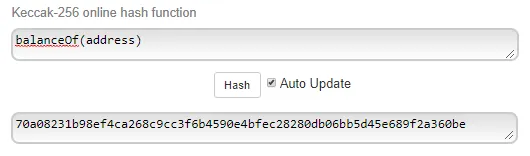
This online tool makes it easier to find the signature of a function.

It’s a bit of a mouthful, but it creates a (mostly) unique identifier for any given function — this allows contracts to conform to a defined interface that other smart contracts can call.

For example, if the function signature for a given function varied from contract to contract, it would be impossible to have an ‘ERC20’ token, because other smart contracts wouldn’t know how to construct a given contract’s function signature.

With that out of the way, we will find the function signature in the first 4 bytes of calldata. We need to extract this signature and then figure out what to do with it.

Solidity will create function signature hashes under the hood so you don’t have to, but Huff is a bit too primitive for that. We have to supply them directly. We can identify the ERC20 function signatures by pulling them out of remix:
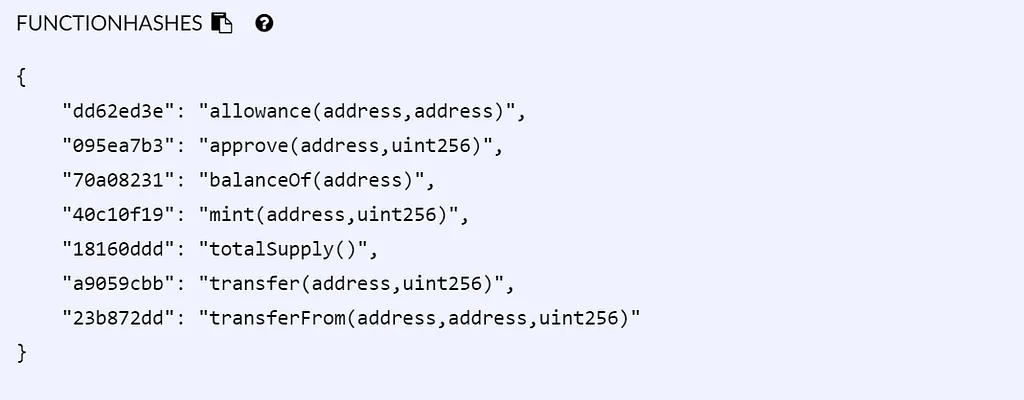
We can parse a function signature by extracting the first 4 bytes of calldata and then perform a series of if-else statements over every function hash.

We can use the bit-shift instructions in Constantinople to save a bit of gas here. 0x00 calldataload will extract the first 32 bytes of calldata and push it onto the stack in a single EVM word. i.e. the 4 bytes we want are in the most significant byte positions and we need them in the least significant positions.

We can do this with 0x00 calldataload 224 shr

We can execute ‘functions’ by comparing the calldata with a function signature, and jumping to the relevant macro if there is a match. i.e:

0x00 calldataload 224 shr // function signature
dup1 0xa9059cbb eq transfer jumpi
dup1 0x23b872dd eq transfer_from jumpi
dup1 0x70a08231 eq balance_of jumpi
dup1 0xdd62ed3e eq allowance jumpi
dup1 0x095ea7b3 eq approve jumpi
dup1 0x18160ddd eq total_supply jumpi
dup1 0x40c10f19 eq mint jumpi
// If we reach this point, we've reached the fallback function.
// However we don't have anything inside our fallback function!
// We can just exit instead, after checking that callvalue is zero:
UTILS__NOT_PAYABLE<error_location>()
0x00 0x00 return

We want the scope of this macro to be constrained to identifying where to jump — the location of these jump labels is elsewhere in the code. Again, we use template parameters to ensure that jump labels are only explicitly called inside the macros that they are defined in.

Our final macro looks like this:

template <transfer, transfer_from, balance_of, allowance, approve, total_supply, mint, error_location>
#define macro ERC20__FUNCTION_SIGNATURE = takes(0) returns(0) {
   0x00 calldataload 224 shr // function signature
   dup1 0xa9059cbb eq <transfer> jumpi
   dup1 0x23b872dd eq <transfer_from> jumpi
   dup1 0x70a08231 eq <balance_of> jumpi     dup1 0xdd62ed3e eq <allowance> jumpi
   dup1 0x095ea7b3 eq <approve> jumpi    dup1 0x18160ddd eq <total_supply> jumpi
   dup1 0x40c10f19 eq <mint> jumpi
   UTILS__NOT_PAYABLE<error_location>()
   0x00 0x00 return
}

{{blog_divider}}

Setting up boilerplate contract code

Finally, we have enough to write the skeletal structure of our main function — the entry-point when our smart contract is called. We represent each method with a macro, which we will need to implement.

#define macro ERC20__MAIN = takes(0) returns(0) {


   ERC20__FUNCTION_SIGNATURE<
       transfer,
       transfer_from,
       balance_of,
       allowance,
       approve,
       total_supply,
       mint,
       throw_error
>()

   transfer:
       ERC20__TRANSFER<throw_error>()
   transfer_from:
       ERC20__TRANFSER_FROM<throw_error>()
   balance_of:
       ERC20__BALANCE_OF<throw_error>()
   allowance:
       ERC2O__ALLOWANCE<throw_error>()
   approve:
       ERC20__APPROVE<throw_error>()
   total_supply:
       ERC20__TOTAL_SUPPLY<throw_error>()
   mint:
       ERC20__MINT<throw_error>()
   throw_error:
       0x00 0x00 revert
}

…Tadaa.

Finally we’ve set up our pre-flight macros and boilerplate code and we’re ready to start implementing methods!But that’s enough for today.

In part 2 we’ll implement the ERC20 methods as glistening Huff macros, run some benchmarks against a Solidity implementation and question whether any of this was worth the effort.

Cheers,

Zac.

Click here for part 2

Read more
Aztec Network
Aztec Network
7 Aug
xx min read

Alpha V5 Proving System Vulnerability

Status

Core contributors identified a critical vulnerability affecting the V5 Alpha proving system on 27 July 2026 through internal AI-assisted auditing.

V5 remains Alpha software. Critical findings can arise during this phase, and the audit process exists to identify them before broader deployment. This finding places V5 funds, applications, and contract state at risk.

Treat funds and applications on V5 as exposed to a protocol-level failure until contributors complete incident response work and operators carry out the required network actions.

What we are disclosing

An attacker may be able to exploit a flaw in the current V5 proving system by constructing a proof that passes verification for a transaction the network should reject. If accepted, that transaction could produce a state transition outside the rules V5 intends to enforce.

Contributors cannot determine whether anyone exploited the flaw before this finding. The affected system lacks the information needed to distinguish ordinary accepted transactions from transactions accepted through the flawed proving path. Historical chain activity cannot establish whether exploitation occurred or quantify its impact.

Application safeguards

We expect application teams to prepare safeguards in the coming weeks.

Those safeguards may include changes to application controls, deployment procedures, user flows, and migration plans. We expect each team to assess its contracts and determine which protections fit its architecture and users.

We expect teams planning a V5 deployment to pause that work until contributors publish further guidance. We expect teams with live contracts to review their ability to limit user exposure, isolate affected functionality, and move users to fresh deployments if needed.

We expect applications that maintain administrative or emergency controls to assess whether those controls can reduce user risk during the incident timeframe.

Next steps

Core contributors are working with operators, application teams, and bridge operators as applications add security guards around affected flows.

The findings from this incident will inform the V6 release, including circuit updates that prevent the network from accepting proofs tied to an affected proving system.

V5 launched as Alpha software, with V6 planned for later in 2026. Contributors will publish a security roadmap covering the remaining work and release path.

Known vulnerability status

Reviewers have not identified other high-severity or critical V5 Alpha vulnerabilities at this time.

Internal and external human audits have completed, and contributors continue AI-assisted auditing. Alpha is the period for identifying faults before production deployment.

Community
Community
4 Aug
xx min read

Dark Forest Aztec Game Goes Live

Dark Forest is a real-time strategy game played across a procedurally generated universe where most of the map is hidden. You cannot see rival players, their planets, or their fleets. You only know what you have explored. Everyone shares one universe, and nobody has the full picture.

In most onchain games, every position and every move is public, because the chain is public. Dark Forest used zero-knowledge proofs to break that assumption: players prove their moves are valid without revealing where those moves came from. The result is a game of hidden information running on a public network.

Dark Forest Aztec ports the original Dark Forest 0.6 to Aztec. It keeps the gameplay from the original and rebuilds the privacy layer on Aztec's programmable privacy.

A note before diving in: this is early, experimental software on Aztec Alpha V5. Treat it as an alpha and play accordingly.

The universe you cannot see

You start on a single home planet with almost the entire map dark. To find anything you mine the universe, running a client that explores coordinates and reveals what sits there: unclaimed planets, resources, and eventually the edges of other players' territory.

You are never handed a view of the board. You earn it one region at a time, and everyone else works under the same fog.

What is hidden on Aztec

Your home coordinates and your fleet movements are private state, expressed as first-class private notes on Aztec. Your location and where you send energy stay hidden, enforced in the contracts by zero-knowledge cryptography.

What sits onchain is a set of cryptographic commitments. Instead of storing every planet's full details in the open, the contracts store Poseidon2 hashes of entity state. When you make a move, your client supplies the full state, the contract checks it against the stored hash, applies the change under zero-knowledge constraints, and writes a new hash back. Full game state lives offchain and gets rebuilt from public logs by an indexer, which is what renders your map without exposing every player's position.

So you can prove you made a legal move from a planet you own without revealing where that planet is. Aztec applies the same principle to private payments and private contracts.

How you play

Four actions carry the game.

Explore. Your explorer sits in the bottom left. Set it running and it uncovers the map around you, surfacing planets, resources, and other players.

Send energy. Most planets produce energy. Click and drag from a planet you own toward a target to capture or weaken it.

Route silver. Asteroid fields produce silver. Move it to your planets and spend it on upgrades, or send it to a Spacetime Rip to convert it into score.

Hunt artifacts. Some planets hold artifacts. Your Gear ship discovers them. Once harvested, you deposit them on planets to boost stats.

Four stats drive most decisions.

Energy is the core resource. Planets generate it over time up to a capacity, and you spend it on everything: claiming planets, reinforcing your own, attacking rivals. Two details matter. Moves are taxed, so a flat percentage of a planet's total capacity burns every time you send energy, which discourages small frequent moves. And energy decays over distance, so send it too far and almost nothing arrives. A common rule of thumb is to let a planet fill to about 75%, then send it down to about 25%.

Defense reduces the damage incoming energy does when it lands. Higher-level planets often have lower defense, but they hold much more energy, so they still take more to capture. Defense matters most on front lines.

Range sets how far a planet can send energy. It governs how fast you expand and how efficiently you move energy inside your own empire, since shorter relative distances mean less decay. Good range also lets you strike deep into an opponent's territory.

Speed sets how quickly a move arrives. Usually secondary, though a fast strike can land before a rival reacts, and some playstyles reward capturing many nearby planets quickly.

Planets can also be upgraded with silver and enhanced with artifacts. Space types carry different multipliers, from mild Nebula to punishing Dead Space, so where a planet sits changes how it plays.

How scoring works

There is a scoreboard, and territory alone does not win it. This round scores two activities: discovering artifacts with your Gear ship, and withdrawing silver through Spacetime Rips.

Point values from the in-game help page:

  • Each unit of silver withdrawn: 1
  • Common artifact: 2,000
  • Rare: 10,000
  • Epic: 200,000
  • Legendary: 3,000,000
  • Mythic: 20,000,000

Silver accrues one point at a time. A single Mythic artifact is worth twenty million of them, so artifact hunting decides rounds and silver withdrawal sets your floor.

Silver has two competing uses. Spend it on upgrades and your planets get stronger, extending range and hardening defense. Withdraw it through a Spacetime Rip and it becomes scored points, but it is gone. Every unit is a choice between building the empire and banking points.

Upgrades tend to win early, since a stronger empire reaches more asteroid fields and finds more artifacts. Late in a round that calculation flips, because a planet you never use is worth less than points already scored.

Artifacts do both jobs at once. They score on discovery, and once deposited they boost a planet's stats, which makes the next expedition easier.

Why you explore

Nothing happens until you find something to act on. Your explorer turns dark space into planets you can capture, asteroid fields you can mine, and artifact-bearing planets you can raid. Sitting still means no new energy, no silver, no score.

Exploring also buys information. The map you have uncovered is an advantage nobody else holds. Knowing where high-level planets sit, which asteroid fields are unclaimed, and where space types shift lets you plan further ahead than someone still working through their starting region.

You find other players as a byproduct. There is no player list. You explore outward until your revealed region touches territory someone already owns: a planet in another player's colors, sitting where you were about to expand. Their home coordinates stay private, so you learn something narrow. Someone is here, roughly this direction, holding this much. You infer the rest, and you have no way of knowing whether they found you first.

What happens when you run into someone

You have three broad options.

Stay quiet and keep growing. Nothing forces you to engage. Keep exploring elsewhere, keep routing silver, keep upgrading. Your positions stay private, so silence costs you only time, which is what you want if they are stronger. The risk is that they are doing the same thing faster.

Fortify the border. If the contact sits somewhere you cannot lose, spend energy hardening the planets facing them. Defense is worth most where an attack will actually land. This keeps the option to fight without committing to one.

Attack. Send enough energy to overwhelm the target's defense and the planet becomes yours, along with its production and its position as a staging post. Higher-level planets are the prize and take proportionally more to crack.

Attacking costs more than energy. A move that lands tells your rival where you strike from, and that you are close enough to be worth answering. Retaliation can then come from directions you have not explored, launched from planets you cannot see.

Multiplayer in practice

Everyone plays one shared universe in real time. No turns, no lobbies. Energy regenerates whether you are watching or not, moves stay in flight while you sleep, and rivals expand while you are away from the screen.

Most strategy games let you watch a threat approach. Here you tend to see the consequences: a planet you owned this morning in someone else's colors, an incoming move you notice once it is already close.

That produces a particular kind of paranoia. You are trying to find everyone else while avoiding being found, and every expansion is a strategic bet that the space ahead is empty.

Information becomes tradeable, because it is scarce. Players compare notes, warn each other about aggressive neighbors, and agree who expands where, then break those agreements when the scoreboard makes it worth breaking.

Why it matters beyond the game

A fully onchain game where players cannot see each other's positions is hard to build, and building it well says something about the platform underneath.

Hidden state, private notes, and client-side proving are the same building blocks behind private applications across Aztec. Dark Forest is a way to watch them work.

Getting started

Dark Forest Aztec is playable now as an alpha. Expect a learning curve; the original was famous for it. DFArchon maintains onboarding material and a community for new players. Round One is live. The universe is dark, and everyone else is out there somewhere. Go find them, quietly.

Play Now

Follow the Builders

DFArchon on X

Source and docs

Aztec Network
Aztec Network
22 Jul
xx min read

How Gas Works on Aztec

Gas on Aztec

Gas on Aztec is known as Fee Juice and is used to pay for transaction costs. This is the same as $ETH on Ethereum. Some apps will handle transaction costs for you under the hood, but if you are using a browser extension wallet, you will not be able to send transactions without it. Fee Juice can be obtained by bridging the $AZTEC token on Ethereum to the Aztec Network L2. This means that under the hood, all activity that happens on Aztec is underpinned by the $AZTEC token bridged into the network. Some bridges like Shield (by human.tech) handle this for you, allowing you to allocate a portion of your bridged transaction to convert into Fee Juice and land in your wallet automatically.

Public vs Private Assets

Assets and transactions on the Aztec Network can be either public or private. If you bridge publicly, your tokens will arrive as public, traceable tokens visible to all. Privately bridging, on the other hand, will give you private assets that are visible only to you. These assets can then be sent privately to another user or wallet without ever revealing who you are, what tokens were sent, how many, or who the recipient is.

Public vs Private Gas

Like tokens on the Aztec Network, Fee Juice (gas) can also be public or private. The reason for this is that even if what you are sending is private, the gas you spend to execute that transaction could still be visible if you are using public Fee Juice, potentially revealing transaction patterns and activity. Private Fee Juice keeps your entire transaction footprint hidden. When you send a private transaction, you can use private Fee Juice, and when you send a public transaction, you can use public Fee Juice, which means your transaction costs are always aligned with the type of transaction you're making.

Fee Juice in Apps

Aztec has native fee abstraction, which means apps could let you pay for transactions in any token you want, or cover your fees entirely. Apps like Nyx may choose to cover part or all of a user's transaction costs, or allow you to pay in tokens that are convenient for you. This means you will most likely never see Fee Juice in an app; instead, you'll pay in whatever makes sense for what you're doing, on your terms. Similarly, you might never even see an Aztec wallet at all, because the app itself becomes your interface that you connect to using your MetaMask wallet.

Fee Juice in Browser Wallets

If you're using a browser extension like Azguard, you'll manage Fee Juice directly in your wallet alongside your private and public balances, converting between tokens as needed to cover transaction costs.

When you bridge tokens in, you'll need enough Fee Juice to cover the cost of your first transaction, then you'll need to monitor how much Fee Juice you have available to make transactions. Browser wallets will allow you to send either publicly or privately to other users and will default to using either public or private Fee Juice depending on the type of transaction. Both private Fee Juice and public Fee Juice will appear by default in your token list.

Wrapping up

How you handle Fee Juice depends on where you're transacting: apps can abstract it away entirely and let you pay in any token, while a browser wallet like Azguard puts it in your hands to manage across public and private balances. Match your gas to your transaction, keep private activity private down to the fee, and you move on your terms.

Aztec Network
Aztec Network
21 Jul
xx min read

Introducing Alpha V5

The Aztec Network today activated Alpha V5, a major protocol upgrade passed by token-holder governance and executed onchain. Alpha V5 reduces private-transaction proving times by more than 2x compared to the previous version, lowers the cost of a fully private transaction by roughly 50%, resolves the critical issues found in V4, and sees the first wave of apps go live. Users can now send private transactions and earn yield on Aave simply by connecting their Ethereum wallets on Nyx, bridge from Ethereum to Aztec using Shield or TRAIN, privately collect NFTs on RavenHouse, or play Dark Forest Aztec, a hidden-information strategy game in a universe that lives entirely onchain. 

"Alpha V5 continues Aztec's work at the frontier of client-side proving, with cryptographic breakthroughs that cut proving times by more than half this release," said Zac Williamson, Co-founder, Aztec Foundation. "We believe Aztec is now the fastest system in the world for proving a fully private transaction entirely on a user's own device, and every release moves the industry closer to private transactions at public transaction speeds."

As the only decentralized privacy L2, Aztec is the credibly neutral privacy layer for Ethereum. Aztec allows anyone to write smart contracts that include both private and public aspects – every private transaction is proven on the user's own device, so no operator, sequencer, or intermediary can see the data. The Alpha V5 proving improvements come from cryptographic advances that make this client-side proving faster than any prior release. The network remains in alpha, but with V5 it is ready for teams to begin building and deploying applications.

Performance - 2.5 second fully private transactions 

Making private transactions practical comes down to how quickly a proof can be generated on a user's own device, without offloading that work to a server that would learn what the user is doing. On Alpha V5, proving a private token transfer natively now takes approximately 2.5 seconds on a consumer laptop, down from 5.2 seconds on V4, and about 6.8 seconds in a browser, down from 12.5 seconds. Across every measured transaction flow, client-side proving times improved by approximately 2x compared with V4.

Bench machine: an M2 MacBook (12 cores, throttled to 8). "Native" runs Aztec's C++ proving binary; "WASM" runs the same prover in a browser engine (Node on V8).

Alpha V5 lowers ECDSA signature-verification cost by approximately 2x, speeds up Poseidon2 hashing by approximately 3x, and reduces the protocol circuit gate count by approximately 50% (gate count is the number of individual operations a proving circuit must perform, and it is the main driver of how long a proof takes to generate). Each of these lowers the amount of work a device performs to prove a transaction, and the reduction in gate count in particular compounds across every proof the network generates.

Apps - send, receive, and earn privately on Ethereum

Alpha V5 launches the first wave of apps on a network where privacy is built into the protocol rather than managed by an operator. On other networks that claim privacy, transactions still pass through an operator or node that reads them in plaintext, or depend on a viewing key that a third party holds, so users rely on someone else to protect their data and to decide when it gets disclosed. On Aztec, every private transaction is proven on the user's own device, so the app, the sequencer, and any operator never need to see the underlying data. Nyx is one of these apps, allowing users to privately send transactions and privately earn yield on Aave. 

"On Ethereum, everything you do is public. That's why we built Nyx: a private account governed by your Ethereum wallet", said Nikhil, Co-founder of Nyx. "Now you can send, receive and earn in private. Nyx was the first app live on the Aztec Alpha, and we're excited to expand participation to more users with the added stability of Alpha V5."

Other apps on Alpha V5 include Azguard and Nethermind (wallets), Shield, TRAIN, and RavenHouse (bridges), and the Aztecscan block explorers. Also launching is Dark Forest Aztec, a game where users explore a universe, control planets, manage planetary energy, expand territory, and launch attacks through strategic play with private state and hidden actions.

Dark Forest Aztec private universe-building gameplay

Lower costs, higher security 

Transaction fees on Aztec come from two main sources: the cost of proving a transaction and the cost of verifying the rollup proof on Ethereum. Alpha V5 reduces both. It lowers the network's proving-cost parameter by 50%, and it reduces the L1 gas required to verify a rollup proof by approximately 40%. Because rollup proofs are verified on Ethereum and that cost is shared across all transactions in a batch, the L1 reduction lowers fees for every user, while the lower proving-cost parameter reduces the per-transaction proving fee directly. Together, these bring the average cost of a fully private token transfer to under a $0.05 transaction cost.

Alpha V5 also hardens the network on several fronts. It resolves critical vulnerabilities found in Alpha V4 along with additional bugs discovered since launch. Aztec's bug bounty program on Cantina also drew more than 234 security researchers to participate. The network remains in alpha, and further bugs may surface as usage grows, but each release has closed the issues found in the last and strengthened the protocol against new ones. With the critical V4 issues resolved and these safeguards in place, Alpha V5 is stable enough for teams to begin building and deploying applications.

Availability

Alpha V5 is live now, view the Alpha V5 landing page for a full list of features, performance updates, and live apps to explore. 

About Aztec

Aztec is the only decentralized, privacy-first Layer 2 on Ethereum. Developers write private and public logic in the same smart contract, and private functions are executed and proven on the user's own device, so no operator sees the underlying data. The protocol is upgraded through onchain governance, and the network settles to Ethereum. For more information, visit aztec.network.